Microsoft Defender is no longer just antivirus. It is a full-spectrum detection engine protecting Windows endpoints in real time. This article looks at endpoint-security research from a controlled lab perspective: how detections work, what defenders can validate, and why offensive testing must stay scoped and authorized.
Quick Overview
Understanding Defender is an important red-team and blue-team exercise. The focus here is how Microsoft Defender detects threats through static scanning before execution and behavioral analysis during execution, and how those signals can be validated in a lab.
Some exercises involve code and payload transformation concepts, but the value is not in publishing copy-paste bypasses. The value is understanding detection logic, telemetry, execution context, and how defenders can build stronger controls around modern EDR and AV solutions.
Why Endpoint Research Matters in 2025
Defender is widely deployed, and understanding its behavior matters for both authorized red teams and defenders. Key points include:
- Signature detection wipes out standard payloads instantly.
- ML-based behavioral analysis flags suspicious process chains.
- Real-time protection often blocks payloads the moment they touch disk.
The practical lesson is that detections follow rules and signals. If you understand those signals, you can test them responsibly and help improve defensive coverage.
What You’ll Learn
I. Defender’s Kill Chain: How It Sees You
You’ll explore how Defender detects both code and behavior.
- Static Evasion:
- Strip identifying metadata from payloads
- Modify open-source crypters to evade detection
- Use PowerShell reflection to bypass AMSI
- Dynamic Evasion:
- Spoof parent-child process relationships
- Unhook APIs and use direct syscalls
- Abuse trusted system binaries (LOLBAS)
II. Strategy Over Syntax: Evasion at Scale
- Understand why basic exclusion tricks still work in enterprise networks
- Build payloads that adapt to environment conditions (e.g., sandbox detection)
- Learn to customize crypters without starting from scratch
- Use AI to identify what gets you caught—and how to fix it
III. Real Evasion Workflow: From Detection to FUD
You’ll walk through an actual workflow:
- Generate a payload to get it flagged.
- Analyze Defender logs to see why and how it got flagged.
- I personally used alot of AI to tweak loader code or PowerShell behavior.
- Debug and debug until Defender stops noticing you.
The process isn’t magic, it’s just methodical testing and refinement—with AI helping you understand what’s happening under the hood.
Hands-On Lab: From Script Kiddie to Ghost
You’ll operate in a Windows 11 environment with Defender fully enabled and configured for real-world detection.
What you’ll use:
- PowerShell’s Defender module to inspect system settings
- AMSI bypass generators
- DefenderCheck to test payload byte-by-byte
- (Advanced but not nessecary for the module) Ghidra + AI plugins to auto-patch flagged functions
You could set goals like : maintain a persistent C2 beacon for 24+ hours with Defender fully active and no alertable anomalies in event logs.
Prerequisites
- Coding is required, but not overwhelming. AI helps make it approachable.
- You should be familiar with:
- C-Sharp scripting
- Basic payload generation tools (like Metasploit or Sliver)
- Using ProcMon or Defender logs for debugging (will help you even more)
If your payloads keep dying and you don’t know why, this module wont help you that much you’ve to invest more into that yourself!
Final Thoughts & Rating
Rating: 8/10
This module is a good way to start if youre not that deep into Evasion. It doesn’t just teach tricks it gives you a good understanding in how Defender works and how to work around it. The labs are brutal at some points, but the AI-assisted approach makes even complex techniques accessible.
Pros:
- Teaches you how Defender actually works, not just how to cheat it
- Labs simulate real detection conditions with full Defender telemetry
- AI makes the coding and troubleshooting process far more manageable
Cons:
- Requires patience your early attempts will get flagged
- Debugging detection is challenging and sometimes frustrating
- AI can help, but it’s not a silver bullet you’ll still need to test and iterate
I really enjoyed this module. It was a great introduction into a new area of offensive security I’ve been wanting to explore for a while: evasion. Defender is tough to deal with and staying ahead of it is always a challenge, but this course showed me it’s totally possible with the right strategy and a bit of patience.
Over just a weekend, I managed to build two working shellcode loaders. It wasn’t easy at all. There was a lot of trial and error, a ton of time spent testing and tweaking, but that’s exactly how you learn. You really need to break things before you can understand them.
This module felt very different compared to the others I’ve taken. It’s more experimental and hands-on, and while it was super fun most of the time, there were parts where I just didn’t understand what was going on. That’s not a bad thing though. For me, those moments pushed me to dig deeper and really try to figure out what was happening behind the scenes.
One thing I can say for sure is that even though some topics were way over my head at first, they started to make sense the more I played with them. The way the content is structured really encourages that kind of learning.
If you’re looking to get into red teaming or just want to try something challenging and practical, this one is definitly worth the effort.
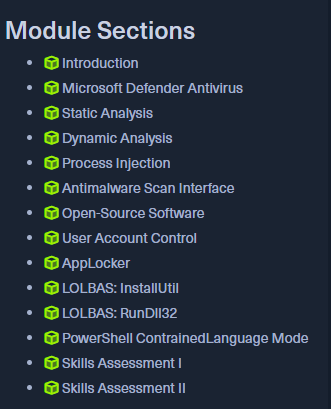
For those interested, here’s a look at the exam table of contents: